 See it in action
 Several values in one field
On this page
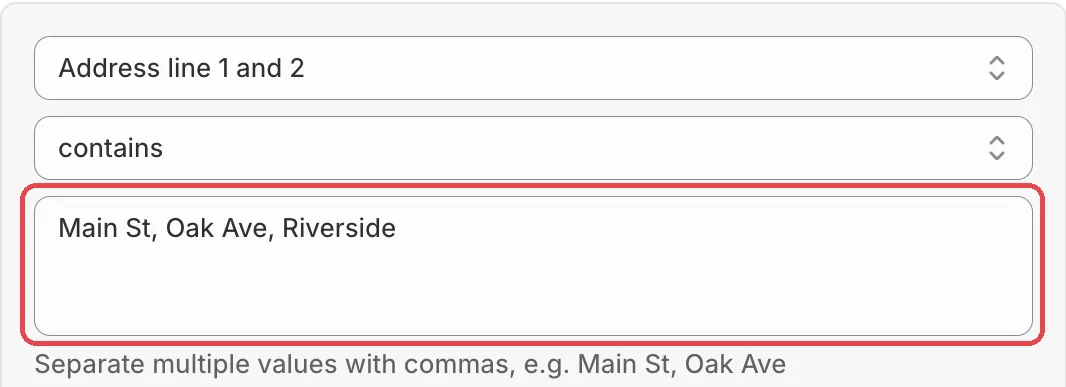
A text condition can hold a list. Separate the values with commas, and the condition matches when any one of them matches. One condition can replace dozens of conditions joined with Any rule passes.
How it works
Under every free-text condition box, a hint tells you to separate
values with commas, for example Main St, Oak Ave.
- Any of:
Main St, Oak Avemeans “Main St” or “Oak Ave”. - Upper and lower case do not matter:
oak avematches “Oak Ave”. - Spaces around commas are ignored:
Main St , Oak Aveworks the same. - Empty parts are skipped:
Main St,,Oak Aveis two values.
What each operator means with a list
| Operator | The condition is true when |
|---|---|
| contains | The checkout value contains any of the parts. |
| does not contain | The checkout value contains none of the parts. |
| is | The checkout value equals any of the parts. |
| is not | The checkout value equals none of the parts. |
Caution The negative operators mean “none of”.
does not containwithMain St, Oak Aveis true only when the address has neither “Main St” nor “Oak Ave”.
Examples from the app
Each condition shows its own example in the hint:
| Condition | Example list |
|---|---|
| Address line 1 and 2 | Main St, Oak Ave |
| Address line 1 | Main St, Oak Ave |
| Address line 2 (Apartment, suit, etc) | Suite 5, Apt 2B |
| Company | Acme Corp, Globex |
| Purchasing company | Acme Corp, Globex |
| Phone number | 555-1212, 555-3434 |
| Email address | @gmail.com, @yahoo.com |
| Selected shipping method | Standard, Express |
| First name | John, Jane |
| Last name | Smith, Doe |
| Full name | John Smith, Jane Doe |
Other text conditions show value one, value two.
Tip Short forms are not typos. Add them as extra values, for example
Jumeirah Lakes Towers, JLT.
Tag and list fields
Some fields take separate entries instead of one text box (for example
Zip code / Postal code and City / Area). Type or paste a, b, c
and the app splits it into three entries. These fields also accept a
trailing * as a wildcard.
Country code and Province code / State code use a picker, so commas do not apply there.
Limits
- A value that really contains a comma is read as two values.
- Long lists make the rule bigger. Keep an eye on the Rule size card, and split very long lists into two rules.