 See it in action
 Volume tiers: Code
On this page
Use this code where your theme has no slot for the app block, like product cards or a spot inside your theme’s own price line. It comes from the theme code library on the app’s Storefront blocks page. To open it, go to Promotions > More actions > See all blocks.
In the app, each entry has your store’s real details filled in. The
recipes and examples here say app--<app-id>--andor_display, so copy
them from the app before you paste.
For every widget’s code in one place, see Add AndOr with code.
One-line tag
Each tag is one line. The app embed fills it in with the same widget as the matching app block.
Note Every tag needs the AndOr Discount Display app embed turned on. With the embed off, the tag shows nothing. See what works without the app embed.
Where to paste a tag:
- Horizon: in the theme editor, add a Custom Liquid block to the product template and paste the tag into it.
- Dawn and similar themes: paste the tag into the product section
code, usually
sections/main-product.liquid.
Volume discount table, one line
The whole buy-more-save-more ladder as a single tag the app embed fills in. It follows the quantity box and the variant picker. With a Volume picker upsell offer, its steps become cards that set the quantity.
<andor-tiers></andor-tiers>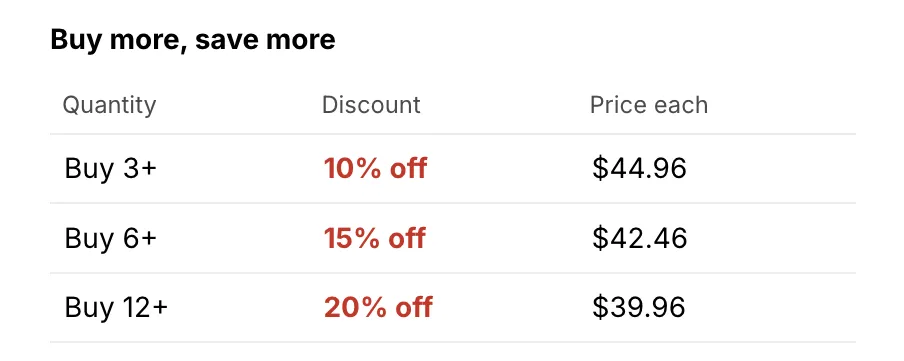
Where it goes: On a product page, wherever you want the table. The usual spot is under the price in sections/main-product.liquid. It has to be on a product TEMPLATE. Do not put it inside a product card or a related-products loop. There it would print this page’s ladder beside a different product.
More: Volume discount table in One-line tags.
Product card recipe
Longer Liquid for the product cards on collection, search and home pages, where apps cannot add a block. These recipes work with the app embed off.
- Dawn and similar themes: most go in
snippets/card-product.liquid. Each recipe says exactly where. - Horizon: do not paste these. Horizon builds its product cards from blocks, so add the AndOr Sale price or AndOr Savings badge app block to the card in the theme editor instead.
The numbers and the full notes for each recipe are in Product card recipes.
Volume discount hint on a card
Recipe 18. An “UP TO 30% OFF” chip on the image, and an info icon by the title that lists the price each for every quantity step.
Save this as snippets/andor-card-tiers.liquid.
Show the code
{% comment %} AndOr Discount Display: volume hint for one product card. {% endcomment %}
{% assign andor_item = card_product | default: product %}
{% assign andor_variant = andor_item.selected_or_first_available_variant %}
{% assign andor_price = andor_variant.price | plus: 0 %}
{% assign andor_now = 'now' | date: '%s' | plus: 0 %}
{% assign andor_none = '' | split: '' %}
{% assign andor_rows = andor_item.metafields.app--<app-id>--andor_display.discounts.value | default: andor_none %}
{% assign andor_shop_rows = shop.metafields.app--<app-id>--andor_display.shop_discounts.value | default: andor_none %}
{% assign andor_all = andor_rows | concat: andor_shop_rows %}
{% if andor_item == blank or andor_item.gift_card? == true or andor_price == 0 or andor_all.size > 50 %}
  {% assign andor_all = andor_none %}
{% endif %}
{% assign andor_best = false %}
{% assign andor_best_top = 0 %}
{% for andor_row in andor_all %}
  {% if andor_row.tier_basis != 'quantity' or andor_row.code != blank or andor_row.variant_ids %}
    {% continue %}
  {% endif %}
  {% if andor_row.group_by == 'variant' and andor_item.has_only_default_variant == false %}
    {% continue %}
  {% endif %}
  {% if andor_row.mode != 'badge_only' or andor_row.kind != 'percentage' or andor_row.tiers == blank %}
    {% continue %}
  {% endif %}
  {% if andor_row.v != 1 and andor_row.v != 2 %}
    {% continue %}
  {% endif %}
  {% assign andor_starts = andor_row.starts_at | date: '%s' | plus: 0 %}
  {% assign andor_ends = andor_row.ends_at | default: '2099-01-01' | date: '%s' | plus: 0 %}
  {% if andor_starts > andor_now or andor_ends <= andor_now %}
    {% continue %}
  {% endif %}
  {% assign andor_top = andor_row.tiers | map: 'value' | sort | last | plus: 0 %}
  {% if andor_top > andor_best_top %}
    {% assign andor_best_top = andor_top %}
    {% assign andor_best = andor_row %}
  {% endif %}
{% endfor %}
{% assign andor_verdict = 'n' %}
{% assign andor_off = 0 %}
{% assign andor_flag = 0 %}
{% assign andor_key = andor_variant.id | append: '' %}
{% assign andor_facts = andor_rows | where: 'mode', 'price' | slice: 0 %}
{% assign andor_shop_fact = andor_shop_rows | where: 'mode', 'price' | slice: 0 %}
{% assign andor_facts = andor_facts | concat: andor_shop_fact | map: 'sale' %}
{% for andor_fact in andor_facts %}
  {% comment %} A sale with no fact, or one that ended before the next sync, is unknown, so hide. {% endcomment %}
  {% if andor_fact == nil or andor_fact.u <= andor_now %}
    {% assign andor_verdict = 'h' %}
  {% endif %}
  {% assign andor_sale = andor_fact.r[andor_key] | default: andor_fact.r['*'] %}
  {% unless andor_sale %}
    {% continue %}
  {% endunless %}
  {% if andor_sale[4] or andor_sale[2] > 0 and cart.currency.iso_code != shop.currency %}
    {% assign andor_verdict = 'h' %}
  {% endif %}
  {% assign andor_cut = andor_price | times: andor_sale[0] | divided_by: 100.0 | round | at_most: andor_price %}
  {% if andor_cut > andor_off %}
    {% assign andor_off = andor_cut %}
    {% assign andor_flag = andor_sale[1] %}
  {% endif %}
  {% assign andor_cut = andor_sale[2] | at_most: andor_price %}
  {% if andor_cut > andor_off %}
    {% assign andor_off = andor_cut %}
    {% assign andor_flag = andor_sale[3] %}
  {% endif %}
{% endfor %}
{% if andor_off > 0 and andor_verdict == 'n' %}
  {% assign andor_verdict = 'b' %}
  {% comment %} Both can stack on one line, so hide. {% endcomment %}
  {% if andor_flag >= 2 and andor_best.with_product and andor_best.class == 'product' %}
    {% assign andor_verdict = 'h' %}
  {% endif %}
{% endif %}
{% assign andor_up_to = 0 %}
{% capture andor_steps %}
  {% for andor_tier in andor_best.tiers limit: 10 %}
    {% assign andor_value = andor_tier.value | plus: 0.0 %}
    {% assign andor_gain = andor_price | times: andor_value | divided_by: 100.0 | round %}
    {% comment %} Skip tiers that do not beat the sale. {% endcomment %}
    {% if andor_verdict == 'h' or andor_verdict == 'b' and andor_gain <= andor_off %}
      {% continue %}
    {% endif %}
    {% assign andor_up_to = andor_up_to | at_least: andor_value %}
    {% assign andor_keep = 100 | minus: andor_value %}
    {% assign andor_each = andor_price | times: andor_keep | divided_by: 100.0 | round %}
    {% if andor_item.price_varies %}
      <span class="andor-card-tiers__row" style="display:flex;justify-content:space-between;gap:2em;padding:0.3em 0.5em;border-radius:0.25em"><span>{{ andor_tier.threshold | ceil }}+</span><span>{{ andor_value | floor }}% off</span></span>
    {% else %}
      <span class="andor-card-tiers__row" style="display:flex;justify-content:space-between;gap:2em;padding:0.3em 0.5em;border-radius:0.25em"><span>{{ andor_tier.threshold | ceil }}+</span><span>{{ andor_each | money }} each</span></span>
    {% endif %}
  {% endfor %}
{% endcapture %}
{% if andor_up_to > 0 and part == 'badge' %}
  <span class="andor-badge" style="position:absolute;top:0.5rem;left:0.5rem;bottom:auto;right:auto;width:auto;height:auto;z-index:2;background:#c0392b;color:#ffffff;border-radius:0.25em;padding:0.15em 0.55em;font-size:0.85em;font-weight:600">UP TO {{ andor_up_to | floor }}% OFF</span>
{% elsif andor_up_to > 0 and part == 'info' %}
  <style>.andor-card-tiers__pop{display:none}.andor-card-tiers:hover .andor-card-tiers__pop,.andor-card-tiers:focus-within .andor-card-tiers__pop{display:block}.andor-card-tiers__row:nth-child(even){background:#f3f3f3}:is(h2,h3,p):has(>.andor-card-tiers)>a{display:inline}</style>
  <span class="andor-card-tiers" style="display:inline-block;vertical-align:middle;line-height:0;margin-left:0.3em">
    <button type="button" class="andor-card-tiers__icon" aria-label="Volume pricing" aria-describedby="andor-card-tiers-{{ andor_item.id }}" style="position:relative;z-index:2;display:inline-flex;align-items:center;justify-content:center;width:1.1em;height:1.1em;padding:0;border:1px solid currentColor;border-radius:50%;background:none;color:inherit;cursor:pointer;font:italic 700 0.7em/1 Georgia,serif">i</button>
    <span class="andor-card-tiers__pop" id="andor-card-tiers-{{ andor_item.id }}" role="tooltip" style="position:absolute;z-index:3;left:0;transform:translateY(calc(-100% - 1.75em));min-width:15em;padding:0.75em 1em;background:#ffffff;color:#1a1a1a;border:1px solid #d0d0d0;border-radius:0.4em;box-shadow:0 4px 12px rgba(0,0,0,0.15);font-size:1em;font-weight:400;line-height:1.6;text-align:left;white-space:nowrap;letter-spacing:normal;text-transform:none">
      <span style="display:block;font-weight:600">Buy more, save more</span>
      {% unless andor_item.price_varies %}
        <span class="andor-card-tiers__row" style="display:flex;justify-content:space-between;gap:2em;padding:0.3em 0.5em;border-radius:0.25em"><span>1+</span><span>{{ andor_price | minus: andor_off | money }} each</span></span>
      {% endunless %}
      {{ andor_steps }}
    </span>
  </span>
{% endif %}
Where it goes: Save it as its own snippet. Then render it twice from snippets/card-product.liquid. Once goes inside the image wrapper, AFTER all the images and before the wrapper’s closing tag. Once goes beside the title. The two lines are below.
Paste this over the image. Save the code above as a snippet named andor-card-tiers. Then, in snippets/card-product.liquid, paste this inside the image wrapper. Put it after both images, just before the wrapper’s closing </div>. On Dawn 16 that is the line before line 108. Not between the two <img> tags.
{% render 'andor-card-tiers', card_product: card_product, part: 'badge' %}And this beside the title. Paste this right after the product title’s closing </a>, before </h3>. On Dawn 16 that is after line 163.
{% render 'andor-card-tiers', card_product: card_product, part: 'info' %}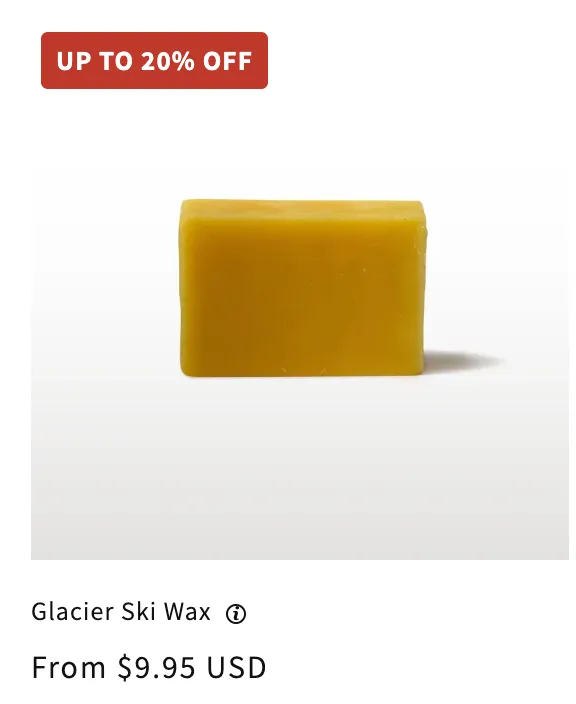
Developer example
Short Liquid to start your own code from. Each one keeps the common
rules and says what it skips. It is written for the product page. On a
product card, change product to card_product.
The same examples, with notes for developers, are in Developer examples.
Volume table
One buy-more-save-more ladder: quantity, discount and price each.
Show the code
{% comment %} AndOr Discount Display: volume table example. {% endcomment %}
{% assign andor_data = product.metafields.app--<app-id>--andor_display %}
{% assign shop_data = shop.metafields.app--<app-id>--andor_display %}
{% assign no_rows = '' | split: '' %}
{% assign product_rows = andor_data.discounts.value | default: no_rows %}
{% assign shop_rows = shop_data.shop_discounts.value | default: no_rows %}
{% assign ladders = product_rows | concat: shop_rows %}
{% assign now_seconds = 'now' | date: '%s' | plus: 0 %}
{% for discount in ladders %}
  {% if discount.tier_basis != 'quantity' or discount.code != blank %}
    {% continue %}
  {% endif %}
  {% assign starts_at = discount.starts_at | date: '%s' | plus: 0 %}
  {% assign ends_at = discount.ends_at | default: '2099-01-01' %}
  {% assign ends_at = ends_at | date: '%s' | plus: 0 %}
  {% if starts_at > now_seconds or ends_at <= now_seconds %}
    {% continue %}
  {% endif %}
  <table class="andor-volume-table">
    <caption>{{ discount.title }}</caption>
    <tr><th>Quantity</th><th>Discount</th><th>Price each</th></tr>
    {% for tier in discount.tiers %}
      {% assign keep_percent = 100 | minus: tier.value %}
      {% assign price_each = product.price | times: keep_percent %}
      {% assign price_each = price_each | divided_by: 100.0 | round %}
      <tr><td>{{ tier.threshold }}+</td><td>{{ tier.value | floor }}% off</td>
        <td>{{ price_each | money }}</td></tr>
    {% endfor %}
  </table>
  {% break %}
{% endfor %}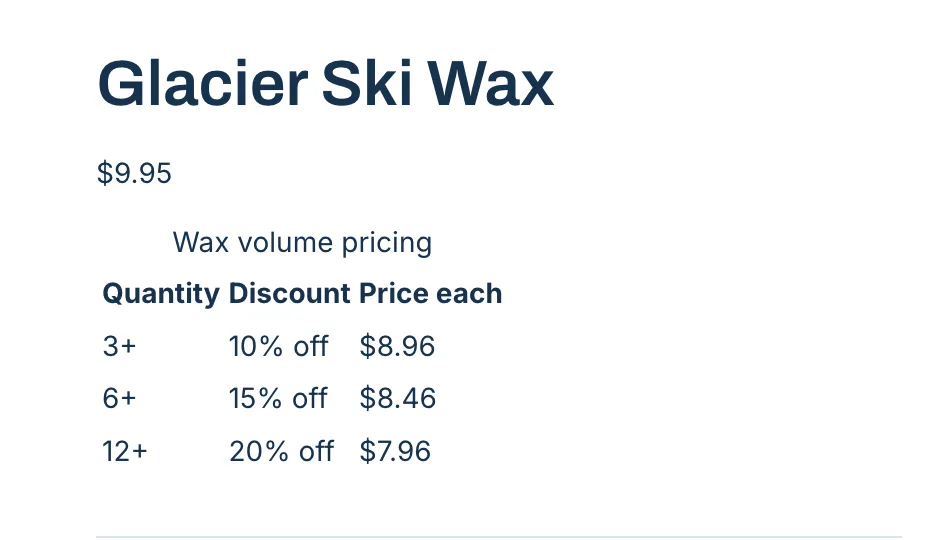
Where it goes: On a product page, in sections/main-product.liquid. It reads the product’s ladder or a storewide one, so keep it out of product cards.
Skips: sales that do or do not combine with the ladder, spend ladders, variant-only discounts, code discounts, gift cards. For the full rules use <andor-tiers></andor-tiers>.