 See it in action
 Current offers: Code
On this page
Use this code where your theme has no slot for the app block. It comes from the theme code library on the app’s Storefront blocks page. To open it, go to Promotions > More actions > See all blocks.
In the app, each entry has your store’s real details filled in. The
recipes and examples here say app--<app-id>--andor_display, so copy
them from the app before you paste.
For every widget’s code in one place, see Add AndOr with code.
Developer example
Short Liquid to start your own code from. Each one keeps the common
rules and says what it skips. It is written for the product page. On a
product card, change product to card_product.
The same examples, with notes for developers, are in Developer examples.
Offers list
Every live deal in the store, with its code if it has one.
{% comment %} AndOr Discount Display: offers list example. {% endcomment %}
{% assign andor_data = shop.metafields.app--<app-id>--andor_display %}
{% assign now_seconds = 'now' | date: '%s' | plus: 0 %}
<ul class="andor-offers">
  {% for offer in andor_data.offers.value %}
    {% if offer.v > 2 %}{% continue %}{% endif %}
    {% assign starts_at = offer.starts_at | date: '%s' | plus: 0 %}
    {% assign ends_at = offer.ends_at | default: '2099-01-01' %}
    {% assign ends_at = ends_at | date: '%s' | plus: 0 %}
    {% if starts_at > now_seconds or ends_at <= now_seconds %}
      {% continue %}
    {% endif %}
    <li>
      <strong>{{ offer.title }}</strong>
      {% if offer.scope != 'all' %}on selected products{% endif %}
      {% if offer.code != blank %}with code {{ offer.code }}{% endif %}
      {% if offer.tier_basis == 'quantity' %}
        when you buy {{ offer.tiers.first.threshold }}+
      {% elsif offer.mode != 'price' and offer.no_minimum != true %}
        on qualifying orders
      {% endif %}
    </li>
  {% endfor %}
</ul>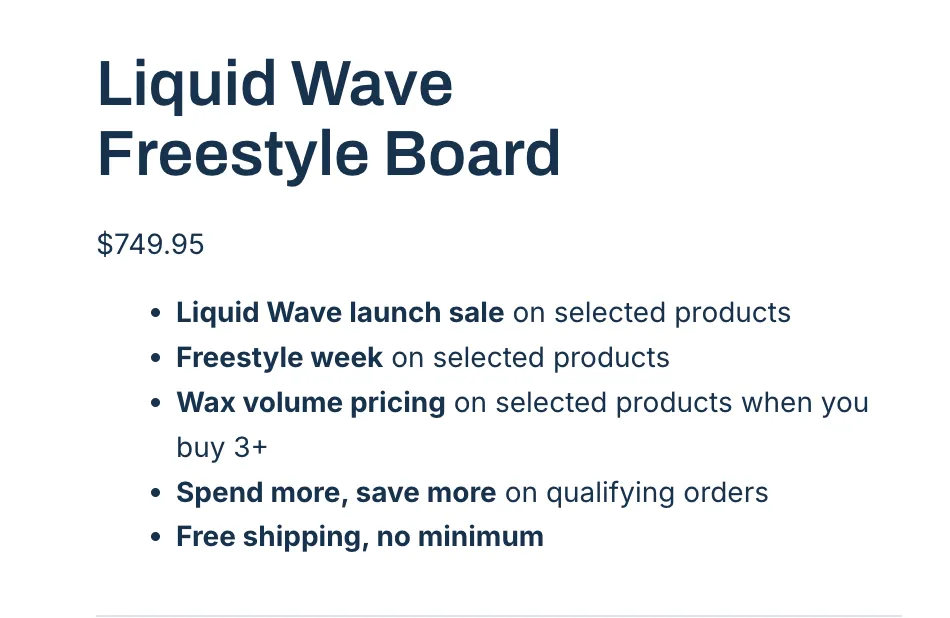
Where it goes: Any page. Near the top of a section, or in layout/theme.liquid just after the opening <body> tag.
Skips: the value of each deal, collection names, the minimum spend. For the full rules use the AndOr Offers block.