 See it in action
 App embed
On this page
The AndOr Discount Display app embed holds the settings AndOr widgets share. Blocks show without it, but some parts of AndOr need it.
What works without the app embed
| Works without the app embed | Needs the app embed |
|---|---|
| Every AndOr block you add in the theme editor on the product page, cart page or a section: sale price, savings badge, countdown, volume tiers, bundle card, Buy X get Y, free gift slot and its line on the product page, goal bar, goal suggestions, current offers, discount callout and collection banner. These blocks use the default colors and default text. |
• One-line tags, on product cards and other places without a block. • Anything in the cart drawer: the gift slot, claim rows and the drawer goal bar. • Your brand color. • Your Storefront text changes and translations. |
We recommend turning it on. It takes one click. It adds the cart drawer parts, your brand color and your text changes. See Turn on the app embed.
Tip The app embed works on every theme. Older vintage themes have no app blocks, so their widgets come from one-line tags. See Vintage themes. The cart drawer parts also need a theme that sends Shopify’s storefront cart events. See Theme requirements.
Open the embed settings
In Shopify, go to Online Store > Themes, click Edit theme, open App embeds, then click AndOr Discount Display.
Settings
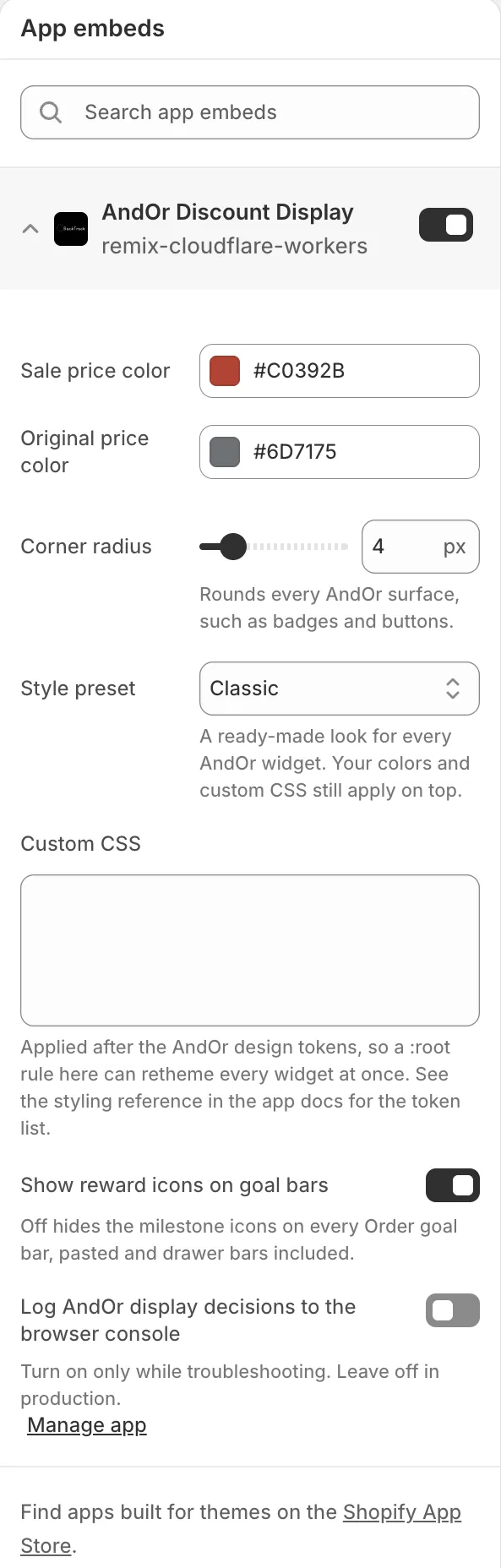
Sale price color
The color of the sale price. Some other widgets use it as their main accent color too, unless their block has its own color set. Left on the default, it follows your brand color from the app.
Default: #c0392b.
Original price color
The color of the crossed-out original price.
Default: #6d7175.
Corner radius
Rounds every AndOr surface, such as badges and buttons. 0 gives
square corners.
Options: 0 to 24 px. Default: 4 px.
Style preset
A ready-made look for every AndOr widget. Your colors and custom CSS still apply on top. A preset’s corner rounding wins over Corner radius.
Options: Classic, Soft, Bold, Minimal, Dark. Default: Classic.
- Classic: the standard look.
- Soft: rounder corners and softer borders.
- Bold: nearly square corners, dark text and strong borders.
- Minimal: square corners and no tinted backgrounds.
- Dark: light text and dark backgrounds, for dark themes.
Custom CSS
CSS that applies to all AndOr widgets. It is added after AndOr’s own
style settings, so a :root rule here can restyle every widget at
once. Example:
:root {
  --andor-color-accent: #0b6b4f;
  --andor-radius: 8px;
}For the full list of names you can set, see Styling tokens.
Show reward icons on goal bars
Shows the small reward icons (like a truck for free shipping) on every Order goal bar. Turn it off to hide them on all goal bars, pasted and cart drawer bars included.
Default: on.
Log AndOr display decisions to the browser console
Writes notes about what each widget decided into the browser console. Turn it on only while you fix a problem. Leave it off on a live store.
Default: off.
Note Theme editor setting names are in English only. Shoppers see widget text in their store language.
Where the brand color fits
Your brand color is not an embed setting. You pick it in AndOr, on the Create promotion gallery, under Brand color. The embed uses it while Sale price color stays on its default. A color you change in the embed wins over the brand color. A color you change on a block wins over both.