 See it in action
 Brand color
On this page
Your brand color is the main color of four storefront widget blocks: the sale price, the volume tiers, the goal bar and the offer picker. You pick it once, in the promotion gallery.
Before you start
- The brand color reaches your widgets only when the app embed is on. See Install and turn on the app embed.
Set it up in the app
-
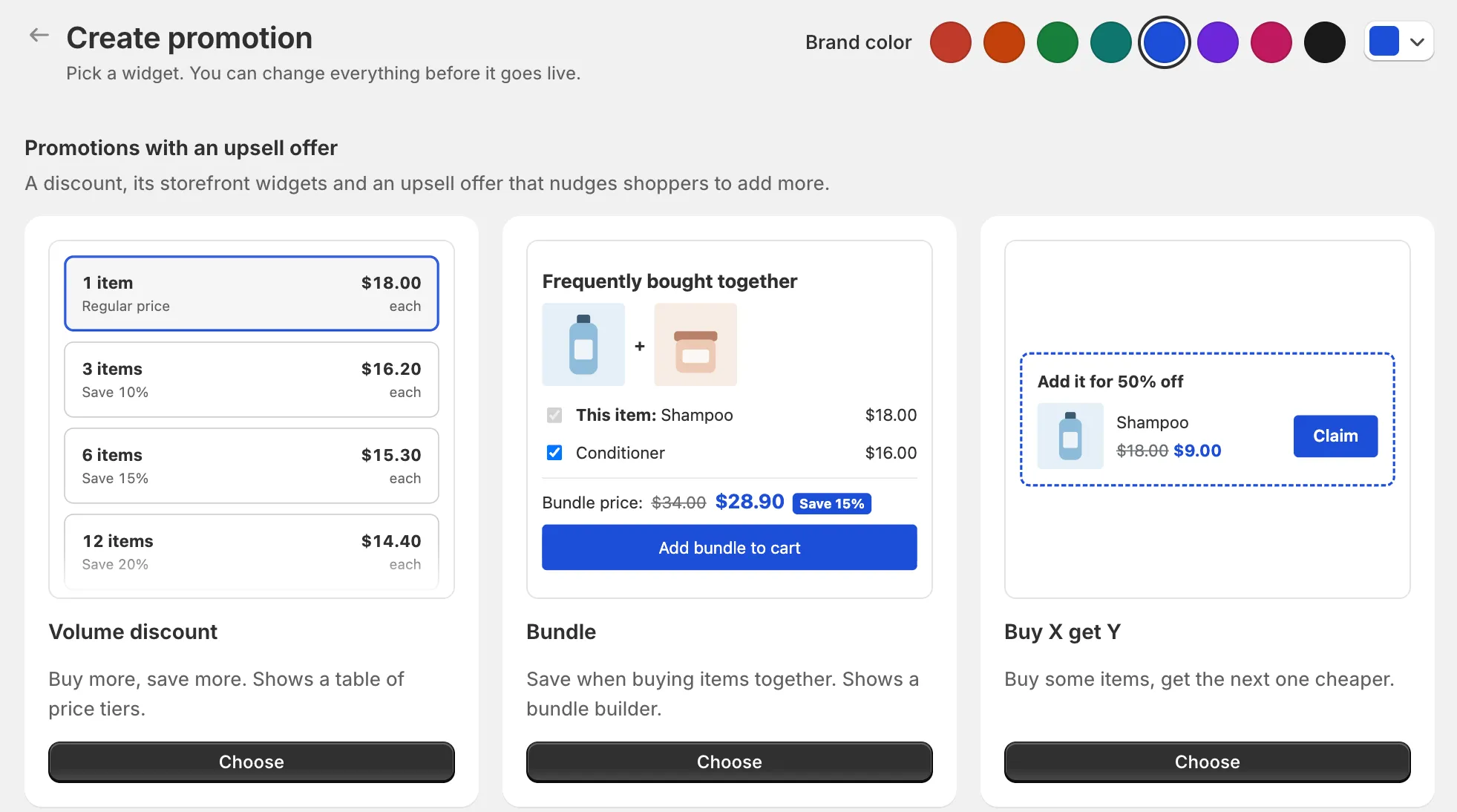
Open Promotions, click Create promotion, and find Brand color on the gallery’s title row.
It shows eight preset swatches and a button that opens a color picker.

-
Click a preset, or open the picker and choose any color.
The gallery cards change at once. There is no save button. The color saves a moment after your last change. If it fails, you see “Brand color not saved. Try again.”
Settings
Brand color
“Saved for your store. A block color set in the theme editor wins.”
Options: Red, Orange, Green, Teal, Blue, Purple, Pink, Black, or any color from the picker. Default: Red (the blocks’ own default).
Which widgets use it
The brand color reaches these widgets:
- AndOr Sale price
- AndOr Volume tiers
- AndOr Order goal (the goal bar and its suggestions)
- AndOr Offer picker (the bundle card, Buy X get Y, the claim row and the gift slot)
These blocks keep their own colors from the theme editor instead: AndOr Savings badge, AndOr Countdown, AndOr Offers, AndOr Collection banner and AndOr Discount callout. Set their colors on the block.
How it works with theme editor colors
For the widgets that use the brand color, the color is picked in this order. The first one that is set wins:
- A color you changed on the block itself in the theme editor, for example Bar color on AndOr Order goal.
- Sale price color on the AndOr Discount Display app embed, when you changed it.
- Your brand color.
- The blocks’ default red.
For example: your brand color is Blue, and you set Bar color on the AndOr Order goal block to green. The goal bar is green. The sale price and the volume tiers are blue.
Tip To use one color across these four blocks, set the brand color and leave their color settings in the theme editor on their defaults.
The promotion page reminds you too: “Widgets use your brand color from the promotion gallery.”
Limits
- One brand color per store.
- Presets are picked so white text stays readable on them, because badges and banners print white text on the color.
- The theme editor settings and the brand color are separate. Changing one does not change the other.